Meet the Kede app, an income and expense tracker built by Kartel Tech. Track money in and out, plan bills and staff pay with Workplan, save with a plan from your real numbers, get verified statements and ask an AI money coach.
The Kede app is an income and expense tracker app built by Kartel Tech for everyone who earns and spends: salaried workers, businesses, freelancers, farmers, students and side hustlers. Beyond tracking what comes in and goes out, it works as a bill planner app, a savings planner and an AI money coach in one place. In this guide, we explain what the Kede app does, who it is for, what it costs and how to start today.
In this guide
- What is Kede?
- Why we built Kede
- Features at a glance
- Track income and expenses in seconds
- Workplan: the bill planner app that remembers who you paid
- Savings goals built from your real numbers
- The AI money coach
- Reports and verified statements
- Works offline, in any currency
- Who it is for
- How Kede is different
- Pricing
- How to get started
- Frequently asked questions
What is the Kede app?
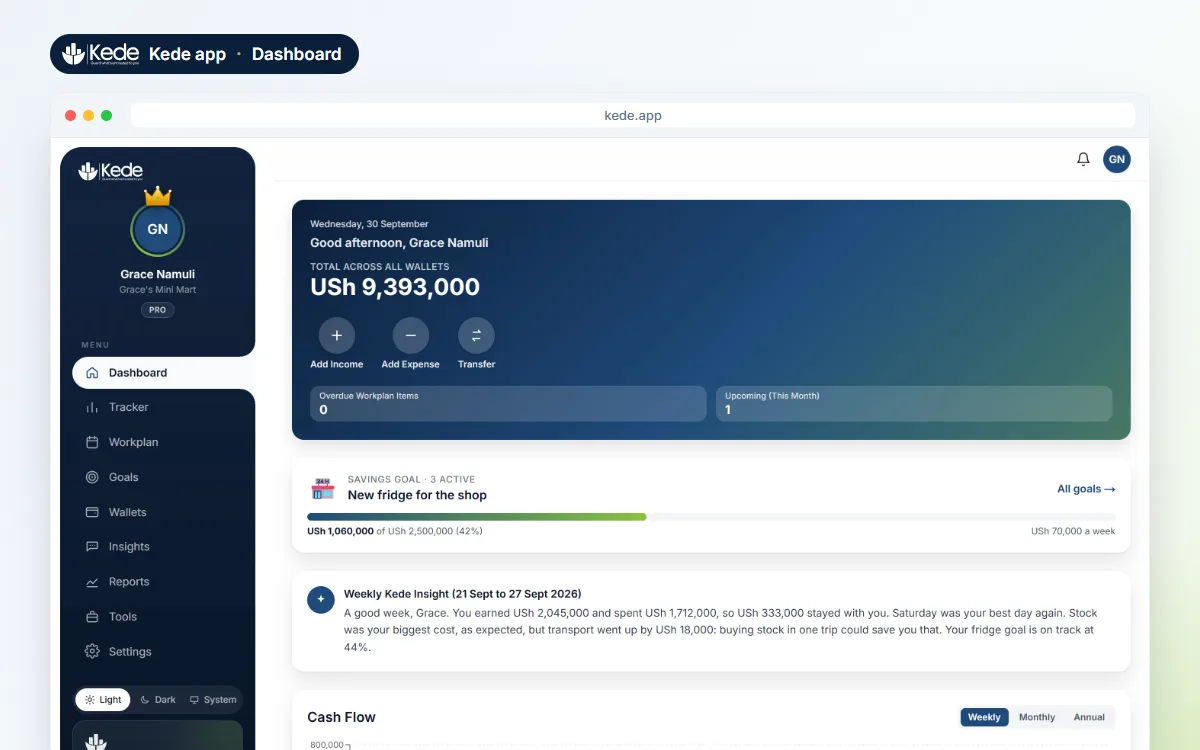
The Kede app is a money app that works in your browser, on Android and on any computer. At its heart, it is a simple income and expense tracker. However, it does much more than record spending. It also plans your bills, builds savings goals from your real numbers, prepares reports you can show a bank, and answers questions about your own money in plain words.
The name comes from the Greek word kēdemonía, which means guardianship: the faithful care of something entrusted to you. That is why the tagline reads “Guard what’s entrusted to you.” Your money is entrusted to you, whether you earn it daily, weekly or once a season. Kede exists to help you guard it well.
You can open Kede in your browser and start free in about two minutes.
Why we built Kede
At Kartel Tech, we build websites, systems and mobile apps for businesses in Uganda. Over the years, we noticed the same problem again and again. Many people earn well, yet they cannot say where the money went at the end of the month.
Most money apps assume one fixed salary and a bank feed. In real life, many people earn in many small amounts, in cash and mobile money, on good days and slow days. A shop owner counts the till at night. Meanwhile, a freelancer waits for a client who pays late, and a farmer earns at harvest but spends all season.
So we built the Kede app for them: a budget app made in Uganda that fits how people here really earn, and that works just as well anywhere else. It is simple enough for the first day, useful for years, and it keeps working even when there is no data. Mobile money is now a normal way to pay and get paid across East Africa, and in Uganda the Bank of Uganda oversees payment systems such as mobile money. Kede does not connect to any bank or mobile money account. Instead, you stay in control of every entry.
Kede app features at a glance
Here is everything the Kede app does, in one list. Each feature has its own section below.
- Daily tracker: record income, expenses and transfers between wallets, and see the day’s profit.
- AI Quick-Add: type “sales 250k, transport 8k, lunch 7k” and Kede turns it into entries you check first.
- Workplan: plan rent, school fees, loans and staff pay, pay in installments and see what is left.
- Savings goals: a weekly saving amount worked out from your real income and spending.
- AI money coach: ask where your money went and get a plain answer, plus a weekly summary.
- Reports and verified statements: charts for you and official statements with a QR code for others.
- Offline and security: works with no data, in any currency, locked with a PIN or fingerprint.
Track income and expenses in seconds
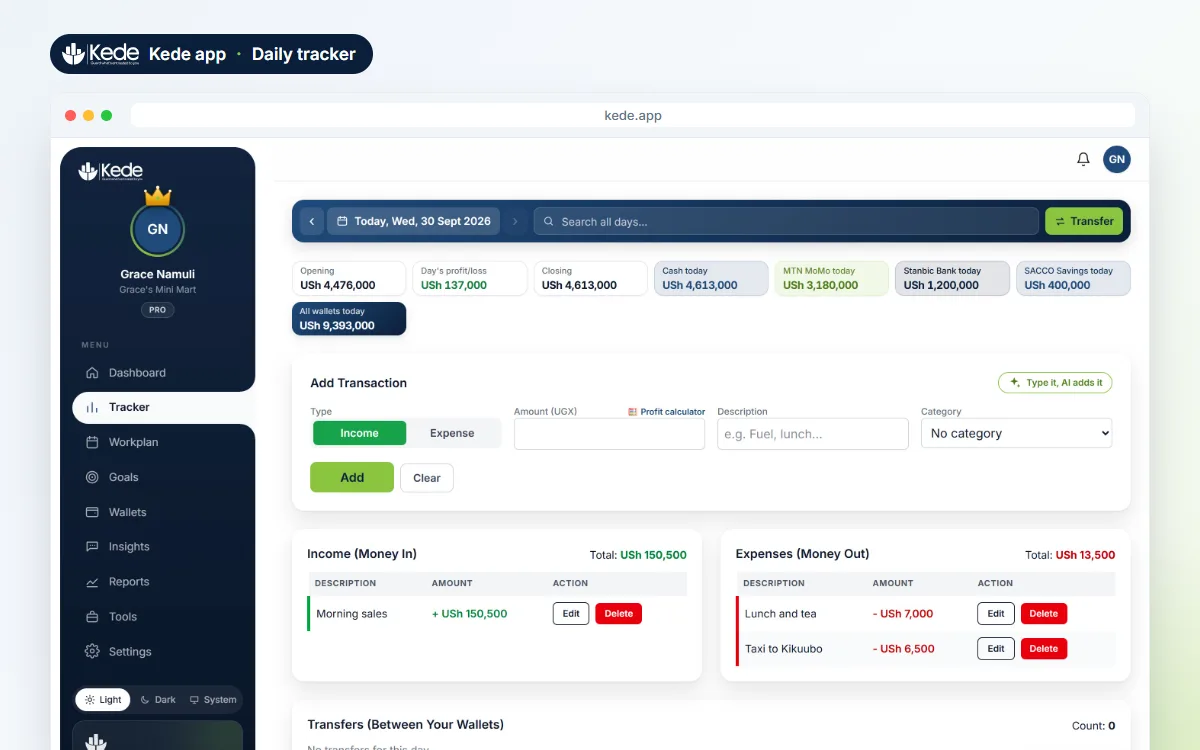
The Tracker is your daily money book. First, you record what comes in, what goes out and what you move between wallets. Then Kede shows your opening balance, the day’s profit or loss and your closing balance at a glance.
Wallets for cash, mobile money, bank and SACCO
Most people keep money in more than one place. For example, you may have cash in your pocket, money on mobile money, a bank account and savings in a SACCO. The Kede app gives each one its own wallet and shows one clear total. Moving money between wallets is a transfer, so it never looks like spending.
Quick Add with AI
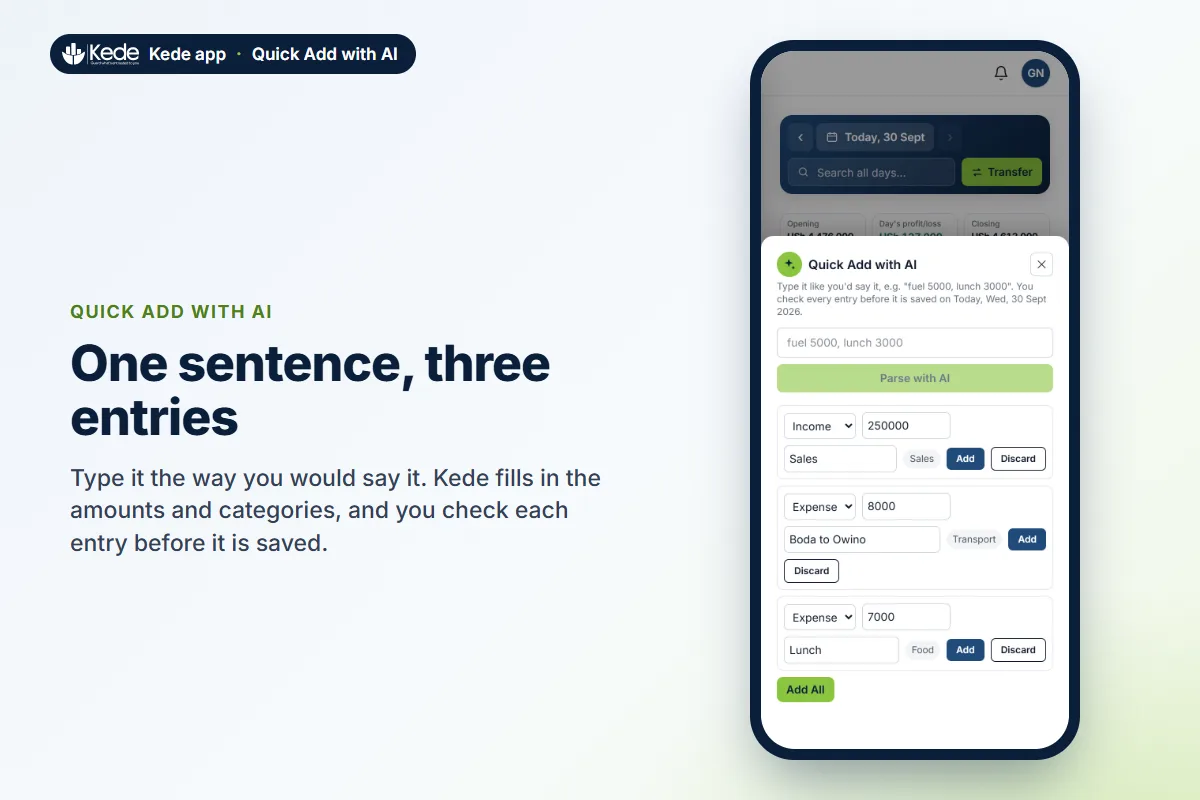
Typing every entry by hand takes time. With Quick Add, you write one sentence the way you would say it, for example “sales 250k, boda to town 8k, lunch 7k”. Kede’s AI turns it into three tidy entries with categories. Nothing is saved until you check each one and tap Add.
Products and services, profit calculator and imports
If you sell things, save your products and services with their prices once. After that, a sale takes one tap. The profit calculator records only the profit from a job, because the costs were never your money to keep.
Moving from a paper book or Excel? Download the Excel template, copy your old pages into it and import everything in one go. Kede checks every row and shows a preview first. On Android, you can also turn a mobile money SMS into an entry in two taps. Our guide on tracking mobile money without the headache shows how.
Workplan: the bill planner app that remembers who you paid
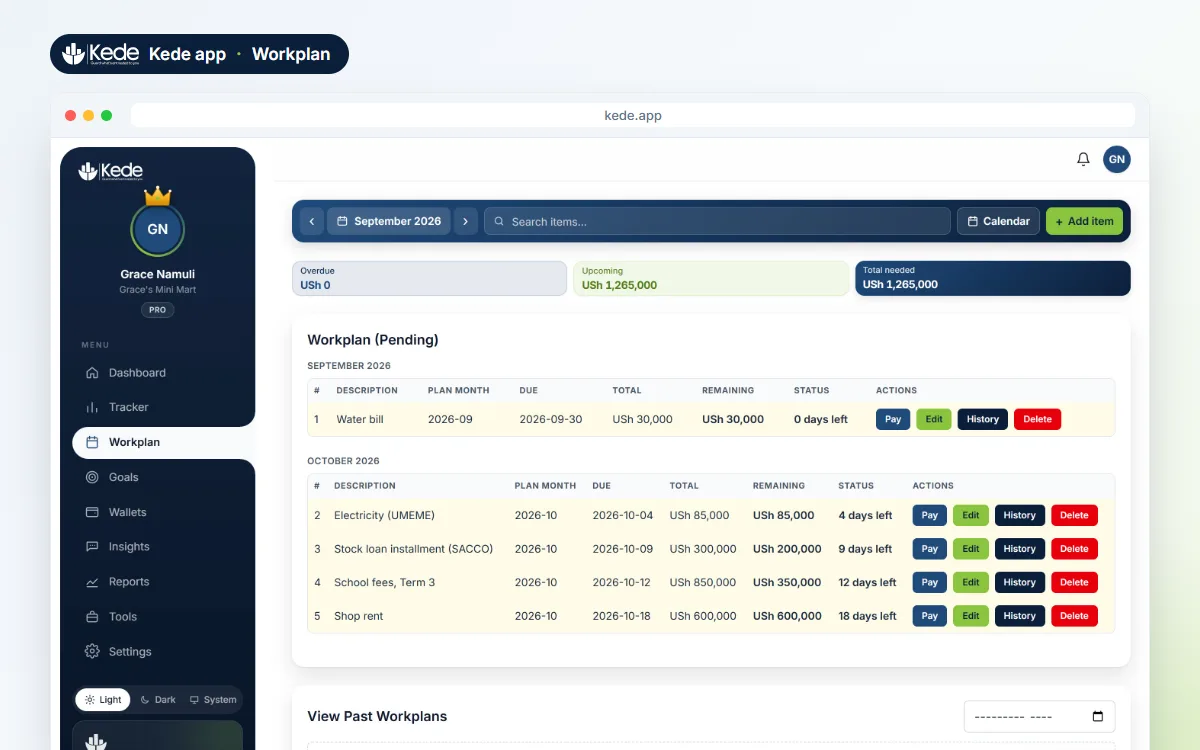
Workplan is the feature people love once they understand it. It holds every payment you have to make: rent, school fees, a loan, a supplier, electricity or a worker’s pay. Each one has an amount and a due date. As a result, you always know what is due, what is paid and what is left.
Pay in installments and keep the history
Big bills rarely get paid in one go. With Workplan, you record each part payment as you make it. Kede saves the date and a note with every payment, shows what is left and marks anything overdue. So you never have to wonder what you paid, to whom or when. Our guide to planning school fees before the term starts walks through a real example.
Repeating bills that create themselves
Rent comes back every month. So do subscriptions, loan installments and wages. In the Kede app, a Workplan item can repeat every week, month or year. Next month’s bill appears by itself, so nothing is forgotten. You can stop a repeat at any time.
A simple payroll register for employers
Workplan also works as a simple payroll register for small employers. Add each worker as an item, for example “Wages: Okello”, UGX 400,000, due on the 28th, repeating every month. Pay an advance on the 15th and the balance on the 28th, and Kede keeps every payment. As a result, you always know who has been paid, who is part paid and who is overdue. It suits shop assistants, drivers, casual labour and house help.
To be clear, Workplan is a record and a reminder. It does not send money, and it does not calculate PAYE or NSSF. For tax rules, the Uganda Revenue Authority is the official source.
Reminders on your phone and in your calendar
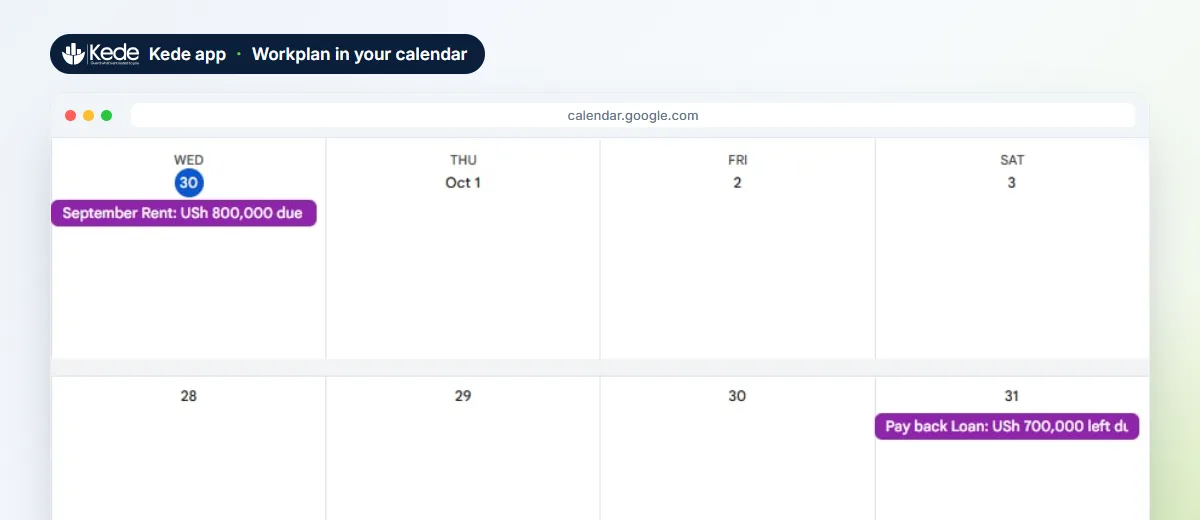
Kede reminds you on your phone the day before a bill is due and on the day. In addition, you can add your bills to Google, Apple or Outlook Calendar in one tap. Each bill shows what is due or what is left, and it updates by itself when you pay.
Savings goals built from your real numbers
Workplan holds money you must pay. Goals, on the other hand, hold money you choose to keep: a laptop, stock for the business, school fees for next year or an emergency fund.
Most apps ask you to guess how much to save. Kede does it differently. When you tap “Help me plan this”, it looks at what you really earned and spent over the last eight weeks and finds what usually stays with you. Then it suggests a weekly amount you can actually keep up. It is also honest about dates. If your goal is too big for your date, Kede says so and shows the date you can reach.
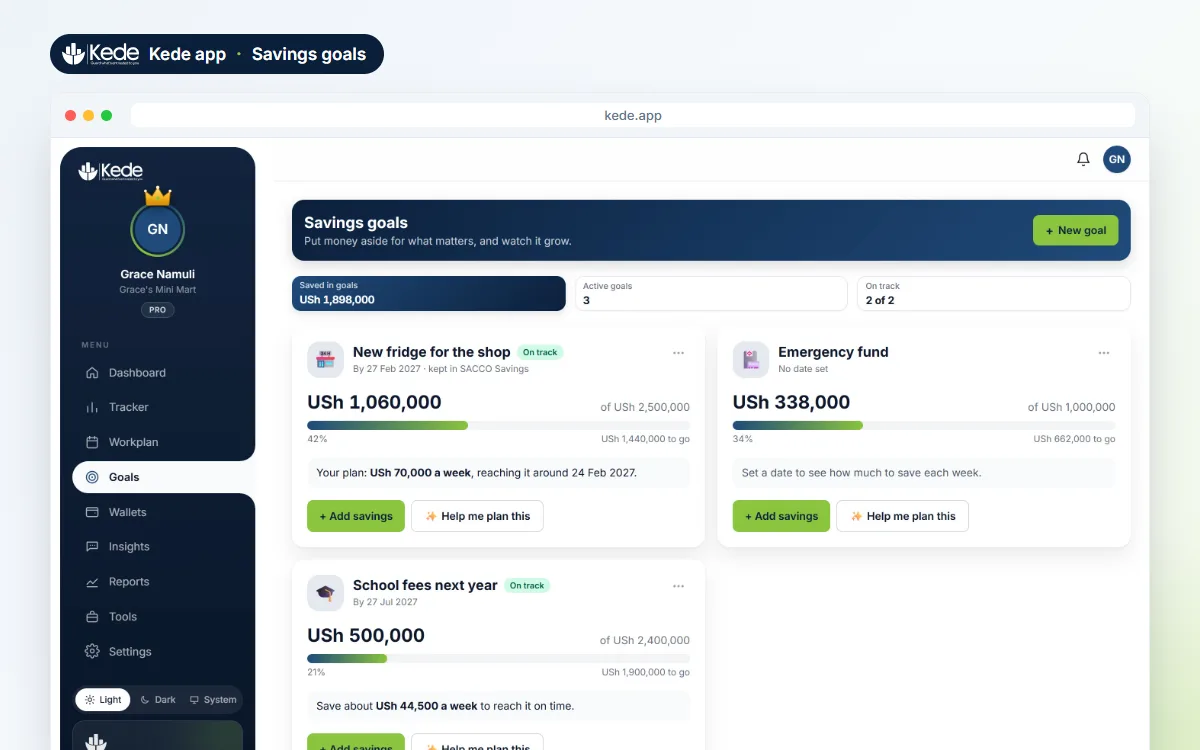
Along the way, you see if you are on track or behind, and by how much. Kede celebrates at 25, 50, 75 and 100%, and it sends a gentle Monday reminder if a goal falls behind. If you keep the money in its own wallet, such as a SACCO account, Kede records a transfer so your balances stay right. If you want more ideas, read how to save when your income changes every day.
The AI money coach: what it does and what it never does
The AI money coach is the part of the Kede app that answers questions. It uses AI to read your own records and explain them in simple words. For example, you can ask “Where did most of my money go this month?”, “What was my biggest expense?” or “What do I still owe?” The coach answers from your real entries, across your whole history.
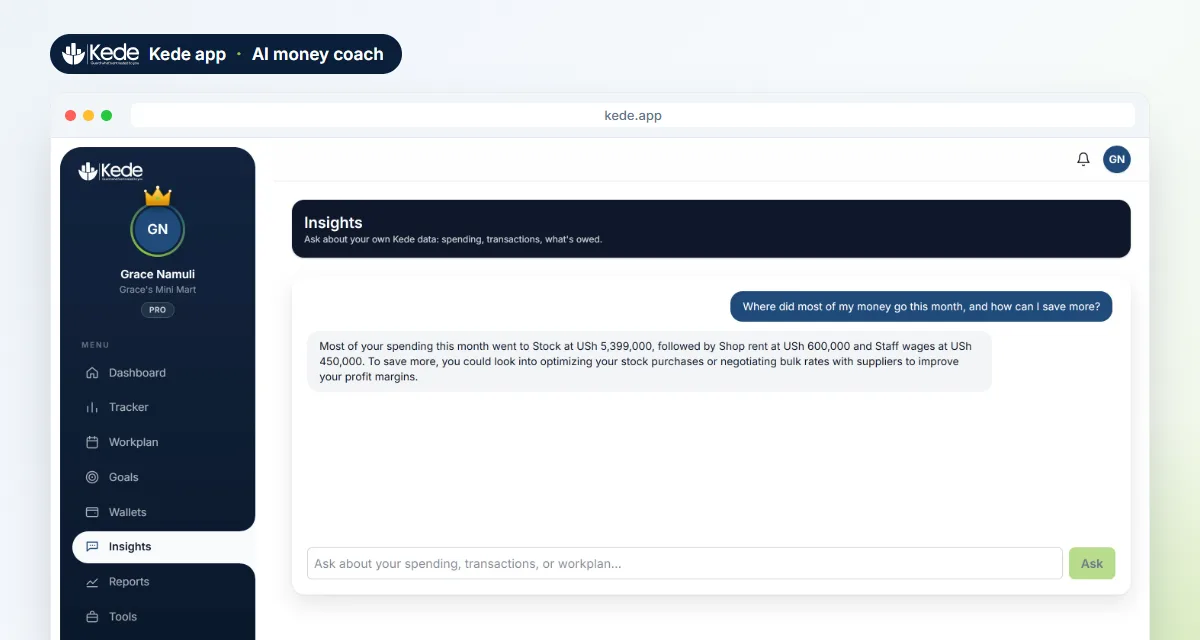
Every week, the coach also sums up how you did: what came in, what went out, your best day and one small step to do better. A monthly summary can arrive by email if you like. Besides that, the same AI powers Quick Add, category suggestions and the goal plans.
However, there are things the coach will never do:
- Your records stay in your hands. The AI only prepares drafts and suggestions, and nothing is saved until you tap Add.
- Only your own account is read. The coach never sees anyone else’s money.
- No sales pitch. The coach never sells you a loan or a product.
- No investment, tax or legal advice. It is a coach that explains your numbers, not a financial advisor.
Kede app reports and verified statements
Reports turn your records into something you can read and show. For yourself, Kede draws charts of your best and hardest months, where your money goes by category and how each weekday performs.
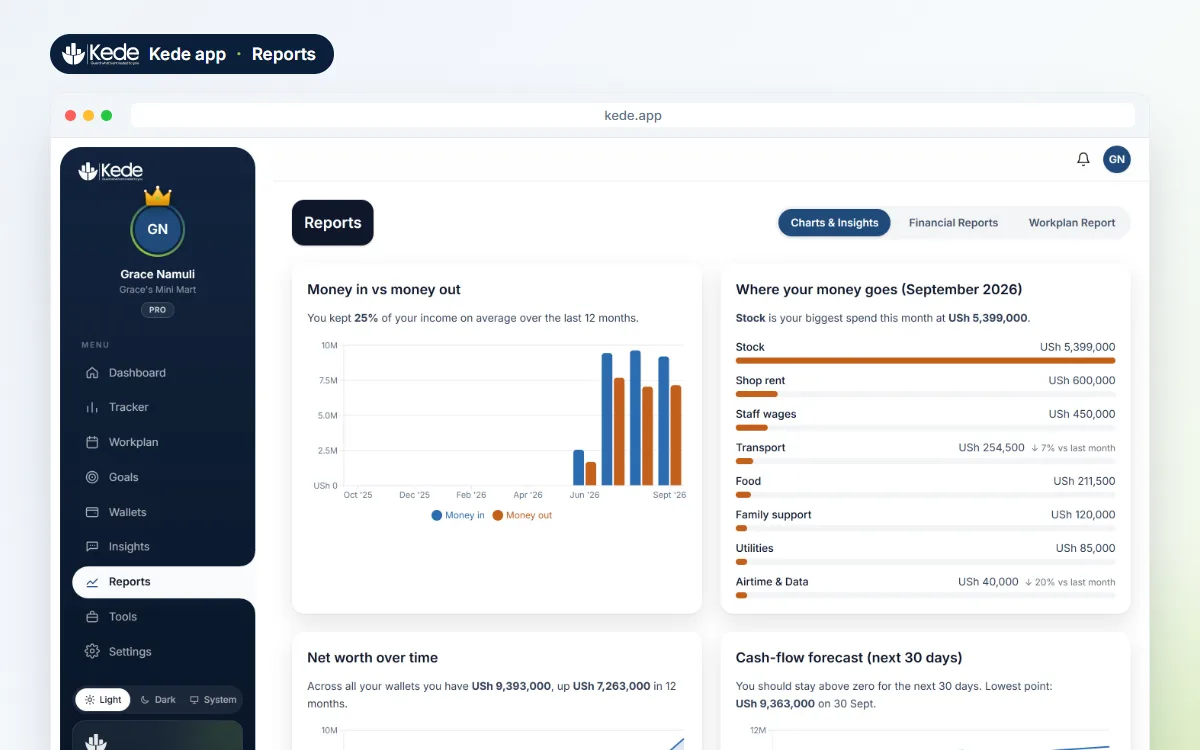
For others, Kede prepares documents you can download as PDF or Excel. The list includes an Income and Expense Statement, an Annual Summary, a Monthly Report, a Daily Ledger, wallet balances and a Workplan report of plans against payments.
An official statement anyone can check
Many people earn well but have no payslip to prove it. Therefore, the Official Statement is one of the most useful parts of the Kede app. Each one carries a unique statement number, a stamp and a QR code. Anyone can scan the code or visit the Kede verification page to confirm the statement is real and unchanged.
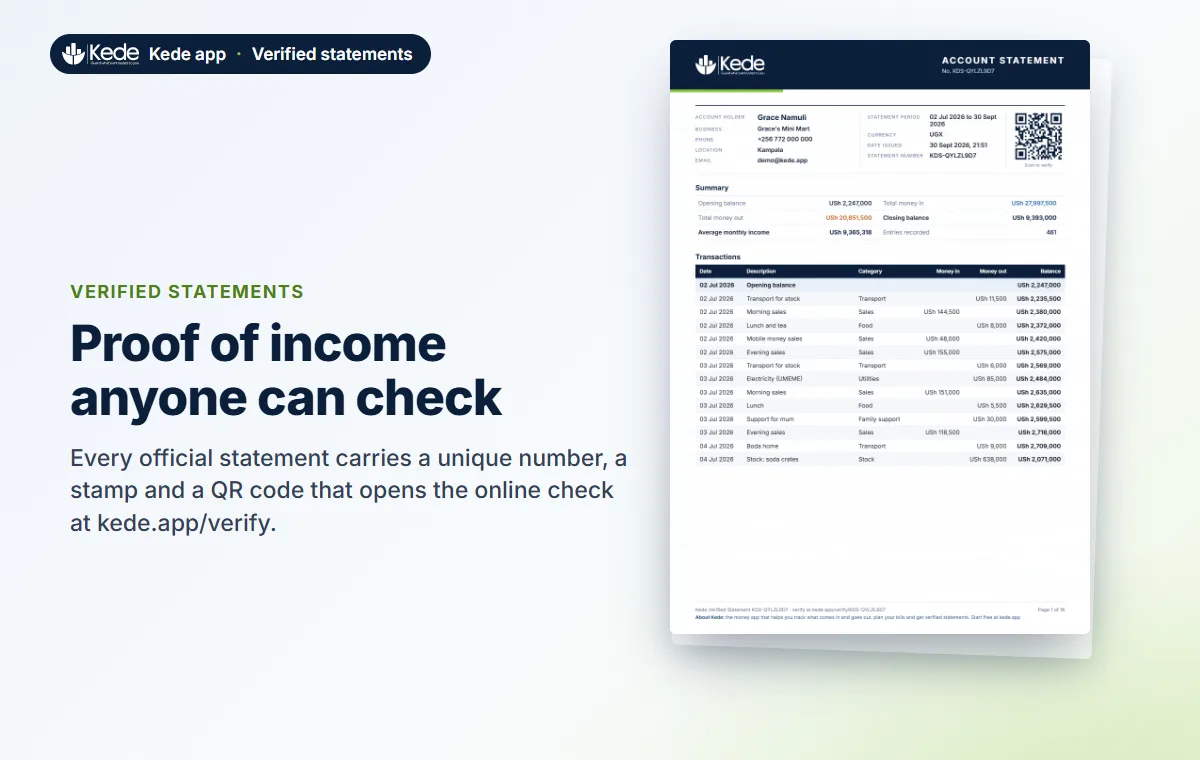
This is useful when you apply for a SACCO or bank loan, rent a house or apply for a visa. SACCOs in Uganda are supervised by the Uganda Microfinance Regulatory Authority, and each lender decides what proof it accepts. Still, a clear, dated statement that can be checked online makes your case easier. Before you borrow, read how to use a SACCO loan without getting stuck.
The Kede app works offline, in any currency
Data is not always there, especially in a market or on a farm. Once you have opened the Kede app with data, it opens with none. You can add, edit and delete entries and record Workplan payments offline. A small banner shows what is waiting, and everything sends by itself when you are back online.
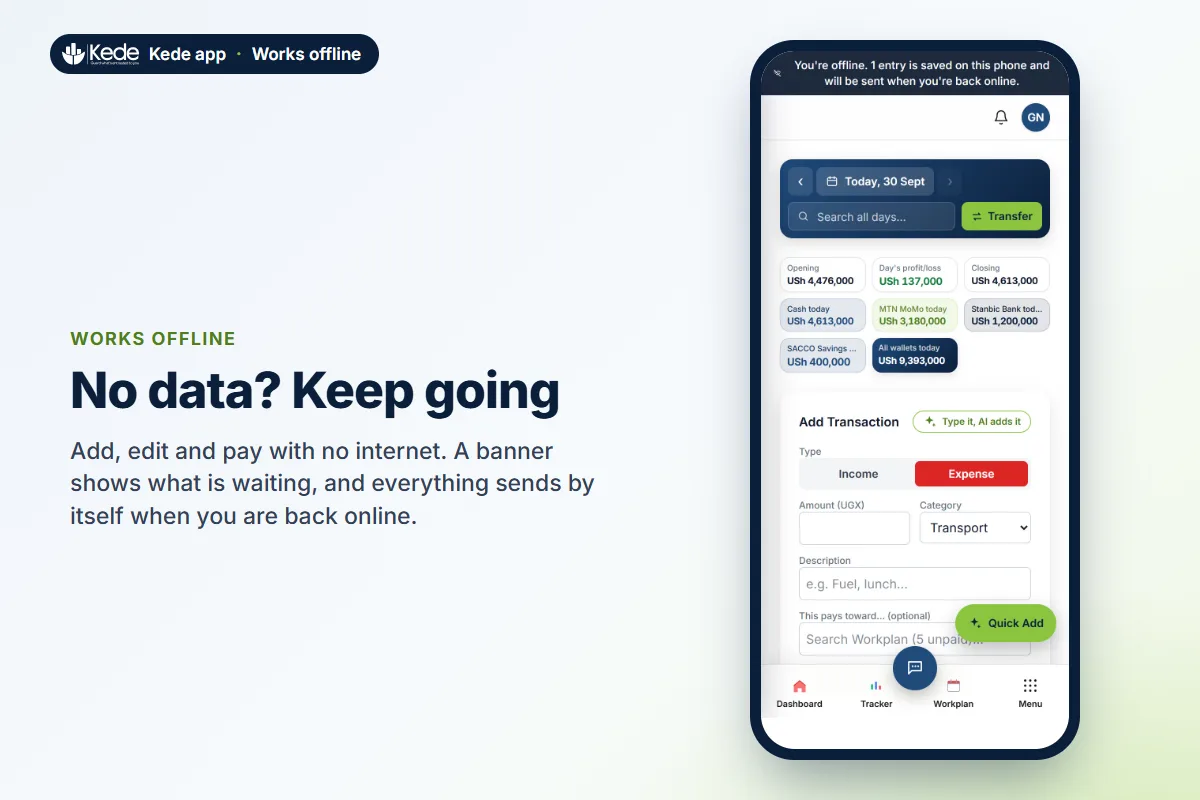
The Kede app also works in any currency in the world. It suggests yours when you sign up, and amounts look the way people write them locally, such as USh 10,000, KSh 400 or $12.50. Finally, you can lock the app with a PIN or, in the Android app, a fingerprint. Your PIN is never stored, only a secure scrambled version of it.
Who the Kede app is for
If you earn money and spend money, there is a place for you in Kede. Here is how different people use it:
- Salaried workers: plan rent, school fees and loans on payday, then save first, not last.
- Businesses and startups: record sales and costs, see the real profit, plan rent and wages, and get a statement for the bank.
- Freelancers: track client payments, build a cushion for the quiet months and prove your income.
- Students and side hustlers: manage an allowance, fees and hustle money, and save for a laptop or a phone.
- Farmers: record seeds, fertilizer, labour and harvest sales, and plan for next season, even offline.
Today, Kede is one person per account. Shared money for families, churches, SACCOs and teams is a direction we are working toward, not a feature you can use yet.
How Kede is different from other expense tracker apps
There are many expense tracker apps. Most of them record spending, and some draw charts. Kede goes further in five ways:
| What you need | A typical expense tracker | The Kede app |
|---|---|---|
| Plan bills and installments | Rarely | Workplan with payment history and repeats |
| Pay staff and remember who you paid | No | Workplan as a simple payroll register |
| Savings plan | You guess an amount | Weekly amount from your last 8 weeks |
| Ask questions about your money | No | AI money coach from your own records |
| Proof of income | Export only | Verified statement with a QR check |
| No data | Often needs internet | Works offline and syncs later |
| Bank login | Often required | Never needed |
In short, a typical tracker tells you what happened. Kede also helps you plan what comes next.
Kede app pricing
You can use Kede for free with no time limit. The free plan includes the daily tracker, Workplan with up to 10 active bills, one savings goal, reports and charts, two wallets, offline use and app lock. It also includes 5 Quick-Adds and 10 money coach questions a month.
Kede Pro adds unlimited AI Quick-Add and coach questions, unlimited goals with the goal coach, full weekly and monthly insights, verified statements, mobile money SMS capture on Android, unlimited wallets and Excel export.
- In Uganda: UGX 10,000 for 30 days, or UGX 100,000 for a full year.
- Elsewhere: each visitor sees a fair local price on the Kede pricing page.
- Trial: every new account gets a 7-day Pro trial, and no card is needed.
- No surprises: there are no automatic charges. You renew when you choose, by mobile money or card.
How to get started with the Kede app
Getting started takes about two minutes:
- Open the Kede website and create a free account with your email and a password.
- Tell Kede what you do. It then sets up categories that fit your work.
- Add today’s money: type it, tap it or say it in one sentence with Quick Add.
- Put your next bills in Workplan and set one savings goal.
- Come back each evening. Kede can send a short reminder if you have not added anything today.
You can use Kede in any browser. On Android, you can download the Android app directly. On iPhone, iPad, Windows and Mac, you can add Kede to your home screen or desktop from the browser. The download page shows each step. Your records stay in sync everywhere you sign in.
Privacy and what Kede is not
Your records are stored securely, and only your account can read them. Kede does not sell your data, and it does not show ads. To keep promises honest, here is what Kede is not:
- Not a bank or a wallet. Kede never holds or moves your money, and it never logs in to your bank or mobile money account.
- Workplan is not tax or payroll software. It records and reminds, but it does not calculate PAYE or NSSF.
- The coach is not a financial advisor. It explains your own numbers and suggests small steps.
Frequently asked questions
Is the Kede app free?
Yes. The free plan has the daily tracker, Workplan, one savings goal, reports and two wallets, with no time limit. Pro adds the full AI features, unlimited goals and wallets, verified statements and exports.
Does Kede connect to my bank or mobile money?
No. Kede never logs in to your bank or mobile money account. You add entries yourself, by typing, with a quick AI sentence, or on Android by sharing one payment SMS when you choose to.
What is the difference between Workplan and Goals?
Workplan is for money you must pay, like rent, school fees, loans and wages. Goals are for money you choose to save, like a phone or an emergency fund. Most people use both.
Can I use Kede to pay my staff?
Yes, as a record and a reminder. Add each worker as a repeating monthly item, pay in parts if you need to, and see who has been paid. Kede does not send the money and does not calculate taxes.
Does the Kede app work without data?
Yes. After the first time you open it with data, it opens with none. You can add, edit and delete entries offline, and Kede sends them when you are back online.
Who built the Kede app?
Kede is built and looked after by Kartel Tech, an IT and software company in Uganda.
Built by Kartel Tech
Kede grew out of the work we do every day for our clients. We design websites, build systems and mobile apps, help businesses get found with SEO services and train people through ICT training.
Do you have an idea for an app like Kede, or a system for your own business? Request a free quotation and tell us what you need.
Start guarding what’s entrusted to you
The Kede app brings your income, expenses, bills, savings and proof of income into one place. It is free to start, it works offline, and it speaks plainly about your own money. Create your free Kede account today and see where your money goes this week.